Microsoft Foundry and Foundry Local: Where should your AI run?
How app development can look like using models running in the cloud and on a local device.
Go to content|Go to the main menu|Go to search

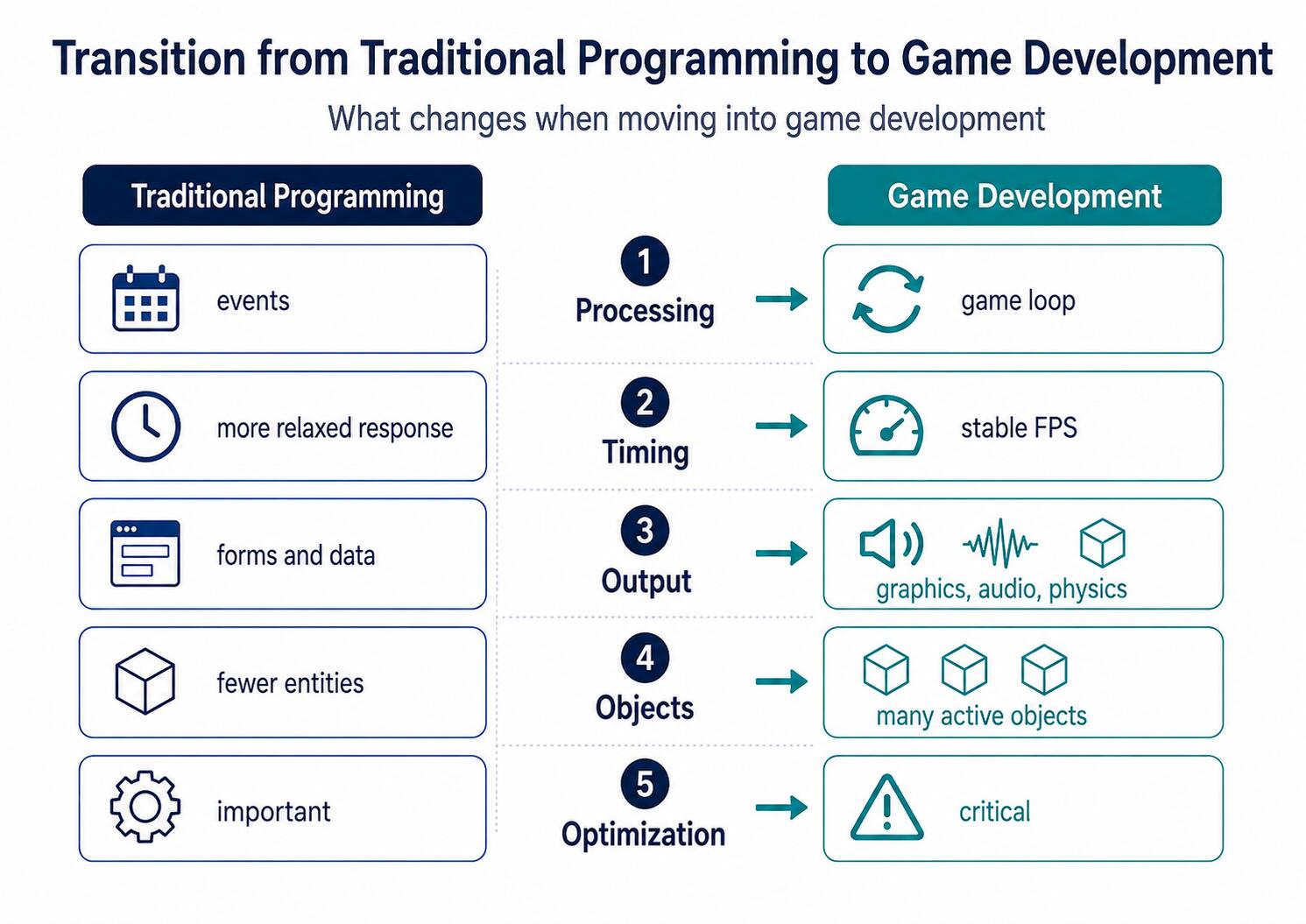
Transitioning from traditional programming to game development doesn't mean throwing away your existing knowledge and starting from scratch. Algorithms, data structures, state management, testing, or dependency management remain just as important. What changes, however, is the way we think about the program: a game must react in real time, maintain a consistent world, and coordinate logic, physics, animations, graphics, and audio simultaneously.
While a standard application often waits for a specific event — such as a form submission or a server request — a game application updates its state continuously. A game programmer therefore doesn't just worry about the correctness of the result, but also its timing, frame rate stability, object lifecycles, and the orchestration of multiple systems running at once.
The main goal of this article is to explain this exact transition: what you can carry over from traditional programming, what new principles you need to adopt, and how a game engine fits into the picture. The practical context is drawn from developing a 2D adventure platformer with a simple combat system, created in the Godot engine by a four-member team consisting of two programmers, an artist, and an audio developer.
Alongside the fundamentals of game architecture, this article compares the Godot, Unity, and Unreal Engine ecosystems, covers the practical use of artificial intelligence, and demonstrates why a Game Design Document is essential for guiding game design.
The core principles of software engineering remain the same regardless of the application type. Game development still relies on algorithms, data structures, object-oriented or functional design, testing, memory management, and source code version control.
The primary difference lies in operational requirements and the fundamental nature of the resulting system.
A standard application might operate like this:
A video game, on the other hand, must continuously update its state. While the game is running:
At a target of 60 frames per second, the application has approximately 16.67 ms to frame and display a single scene. Every system required for that frame must fit within this strict time budget.
In a conventional application, it might feel natural to create an object, use it, and then discard it. In a game, however, certain objects are instantiated extremely frequently — such as projectiles, particles, enemies, or audio sources.
A naive approach might look like this:
Projectile projectile = Instantiate(projectilePrefab);
projectile.Initialize(position, direction);
Destroy(projectile.gameObject, 3f);
While this solution is simple and perfectly fine for a small number of objects, spawning and destroying instances at high frequencies can cause unnecessary allocations, trigger frequent garbage collection, and lead to performance hiccups.
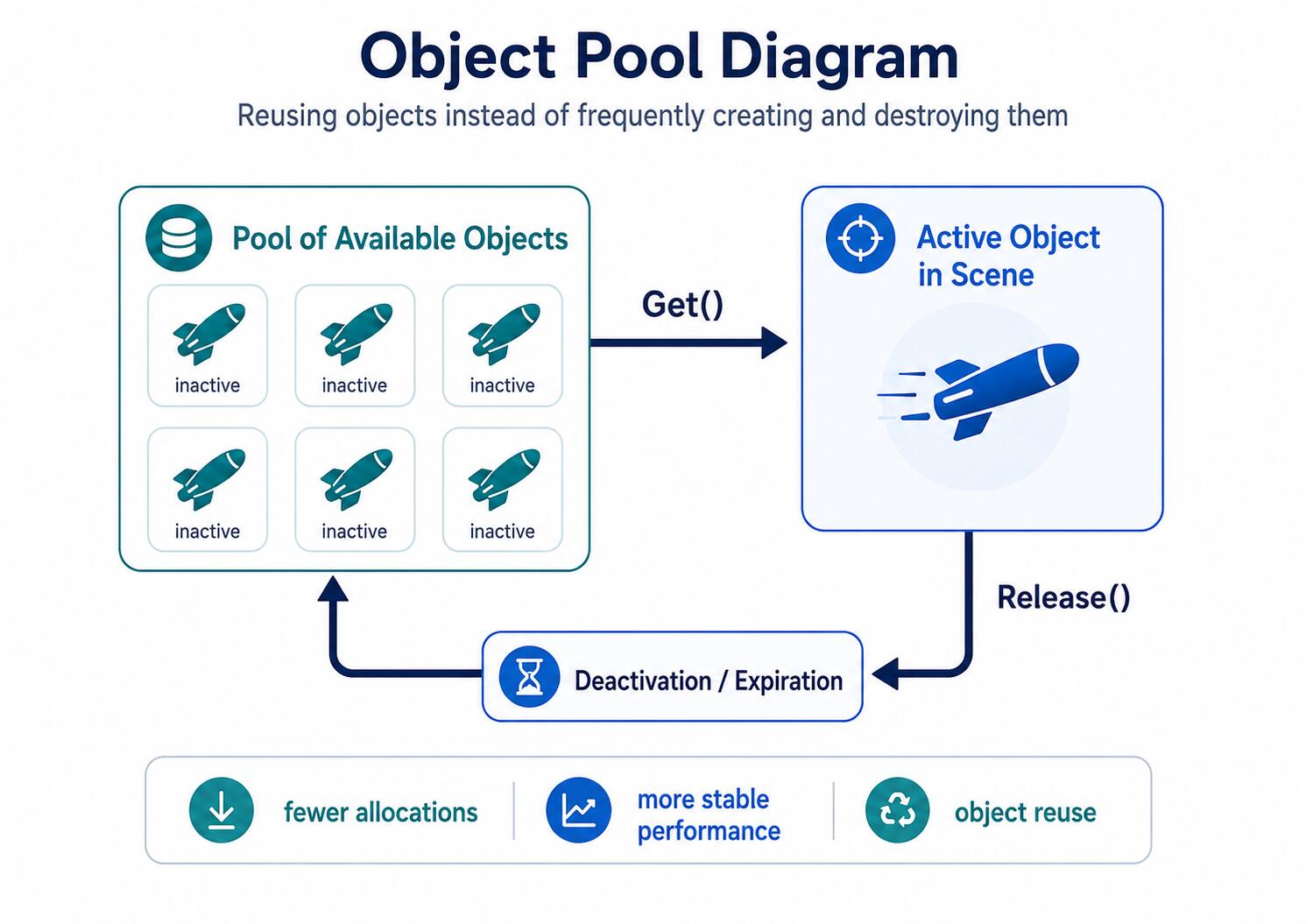
An alternative approach is object pooling:
Projectile projectile = projectilePool.Get();
projectile.Activate(position, direction);

// After hit or lifetime expiry:
projectilePool.Release(projectile);
The object is never physically destroyed. It is simply deactivated, returned to a pool, and reused later on.
Real-World Experience: Object pooling isn't automatically the right choice for every single object. It introduces more complex state management and requires a rigorous reset of all values, events, animations, and physical properties.
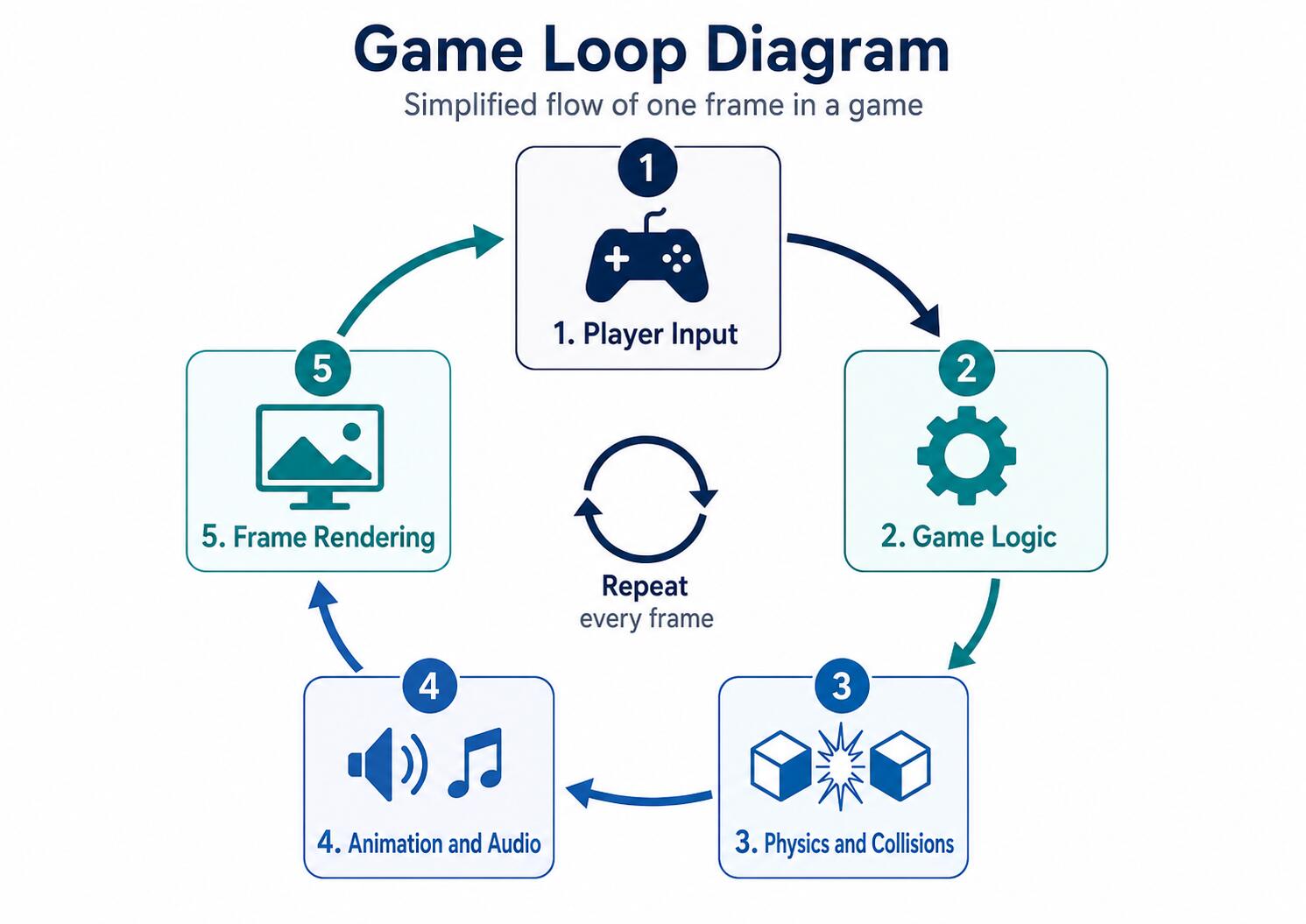
The game loop is the main control loop of a game. It coordinates input processing, game logic, physics, and rendering.
A simplified implementation might look like this:
while (isRunning)
{
    ProcessInput();
    UpdateGame(deltaTime);
    SimulatePhysics(fixedDeltaTime);
    Render();
}
In modern engines, you rarely write the main loop by hand. The engine runs it under the hood and invokes pre-configured methods, events, or callbacks.
Even so, a game programmer must understand when individual code segments execute. Logic placed in the wrong phase can lead to unstable physics, input lag, or inconsistent behavior across devices with varying performance capabilities.
Object movement should never depend directly on the number of rendered frames.
position.x += speed;If this code runs once per frame, the object will move roughly twice as fast at 120 FPS as it would at 60 FPS.
position.x += speed * deltaTime;The deltaTime variable represents the time elapsed since the previous update. This allows movement speed to be expressed frame-independently—for example, in meters or pixels per second.
Important: Physics step updates are usually calculated at a fixed interval. Input, animations, and visual logic might run at a different frequency. Mixing these execution modes without careful consideration is a common pitfall.
Relying purely on deep inheritance hierarchies can quickly produce hard-to-maintain codebases:
GameObject
└── Character
└── Enemy
└── FlyingEnemy
└── ArmoredFlyingEnemy
A component-based design composes a game object out of smaller, reusable capabilities:
Enemy
├── HealthComponent
├── MovementComponent
├── AttackComponent
├── InventoryComponent
└── AIController
This approach offers several practical benefits:
A state machine is ideal for systems that exist in one of a few clearly defined states at any given time.
An example of enemy AI behavior:
Idle → Patrol → Chase → Attack
↓
Dead
For smaller systems, a simple switch statement is clear and efficient. For complex logic, it's better to break states out into separate classes, nodes, or data-driven configurations.
An object pool pre-allocates objects and reuses them over time.
When returning a game object to a pool, resetting it to its default state is mandatory. You will typically reset:
Rule of Thumb: Use pooling only where profiling actively shows high allocation rates or frame time stutter. Optimizing without measuring usually just adds unnecessary complexity.
A game engine is a collection of software tools and runtime systems designed to handle the repetitive, fundamental aspects of game creation. It typically provides:
A game engine does not eliminate the need for programming. It eliminates the need to reinvent the foundational tech stack that almost every game requires (Godot, Unity, Unreal Engine, etc.).
Godot centers its workflow around a tree of scenes and nodes. Each node represents a specific capability or piece of an object—such as a sprite, physics body, camera, animation player, or audio stream.
Primary supported languages:
Godot is distributed under the highly permissive MIT license. You can freely use, modify, and distribute the engine for commercial projects, provided the license notice is retained. For small teams, the ability to release games without revenue-based royalty fees is a huge advantage.
Unity is structured around GameObjects and attached components, with C# serving as its primary programming language.
Unity offers a free Personal plan for individuals and small entities meeting current revenue thresholds. As of mid-2026, the ceiling sits at $200,000 USD in annual revenue or funding over the preceding 12 months. Unity Pro subscriptions in 2026 cost around $2,310 USD per seat annually when paid yearly. Exact licensing implications should always be reviewed based on company size, target platforms, and distribution channels.
Unreal Engine combines C++ with a powerful visual scripting system called Blueprints. It is renowned for high-end 3D rendering, animation tools, cinematic features, and massive world creation.
For games distributed to end-users utilizing Unreal Engine code at runtime, Epic applies a standard 5% royalty fee on lifetime gross revenues exceeding $1,000,000 USD. Revenue generated via sales on the Epic Games Store is currently exempt from this royalty fee.
To compare these engines, let's look at basic character movement. Note that these examples aren't direct apples-to-apples comparisons, as each engine relies on a different object model and offers varying levels of out-of-the-box abstractions.
extends CharacterBody2D

@export var speed: float = 250.0

func _physics_process(delta: float) -> void:
    var direction := Input.get_vector(
        "move_left",
        "move_right",
        "move_up",
        "move_down"
    )

    velocity = direction * speed
    move_and_slide()
Godot provides a dedicated _physics_process() callback tailored specifically for physics updates. Input actions are defined globally within project settings.
using UnityEngine;

[RequireComponent(typeof(Rigidbody2D))]
public sealed class PlayerMovement : MonoBehaviour
{
    [SerializeField] private float speed = 5f;

    private Rigidbody2D body;
    private Vector2 input;

    private void Awake()
    {
        body = GetComponent();
    }

    private void Update()
    {
        input = new Vector2(
            Input.GetAxisRaw("Horizontal"),
            Input.GetAxisRaw("Vertical")
        ).normalized;
    }

    private void FixedUpdate()
    {
        body.linearVelocity = input * speed;
    }
}
Unity explicitly separates polling input in Update() from applying physical forces or velocities in FixedUpdate().
void APlayerCharacter::Move(const FVector2D& InputValue)
{
    if (!Controller)
    {
        return;
    }

    const FRotator Rotation = Controller->GetControlRotation();
    const FRotator YawRotation(0.0f, Rotation.Yaw, 0.0f);

    const FVector Forward =
        FRotationMatrix(YawRotation).GetUnitAxis(EAxis::X);

    const FVector Right =
        FRotationMatrix(YawRotation).GetUnitAxis(EAxis::Y);

    AddMovementInput(Forward, InputValue.Y);
    AddMovementInput(Right, InputValue.X);
}
Unreal Engine uses a more sophisticated character and movement system. The extra boilerplate pays off through deep integration with built-in engine features like the Character Movement Component, network replication, and root motion mechanics.
In the next part of this series, we’ll take a look at a comparison of individual engines—not by their popularity, but by their suitability for specific projects.

Thank you for your interest in subscribing to our newsletter! To complete your registration you need to confirm your subscription. We have just sent you a confirmation link to the email address you provided. Please click on this link to complete your registration. If you do not find the email, please check your spam or "Promotions" folder.