From Traditional Programming to Game Development II - Comparing the Engines
19.11.2026Jaroslav Potočiar
In the previous article, we introduced the theoretical principles behind transitioning from software development to game development, along with the most well-known game engines, their pros, cons, and licensing terms. Now, we’ll look at how suitable each engine is for different projects and various criteria.
Comparing the Engines
You shouldn't pick a game engine purely based on popularity. The choice should stem from the explicit requirements of your project.
Technical Criteria
Target platforms
Visual fidelity and rendering requirements
World size and streaming demands
Multiplayer networking model
Physics performance
Target hardware specs
Ecosystem of required plugins
Team Criteria
Programmer experience and language proficiency
Artists' and designers' familiarity with the editor
Hiring availability in the talent market
Preferred team collaboration workflows
CI/CD build automation and testing capabilities
Business Criteria
Licensing fees and revenue splits
Vendor lock-in risks
Long-term engine support and stability
Cost of third-party tooling
Porting expenses for target platforms
Recommendation: Build a small technical prototype focusing strictly on the highest-risk mechanics of your game before locking in your engine choice.
Engine Popularity in the Industry
Engine popularity can't be summed up by a single universal ranking. Results shift dramatically depending on whether you look at published game counts, active developer bases, job postings, mobile markets, indie teams, or AAA studios.
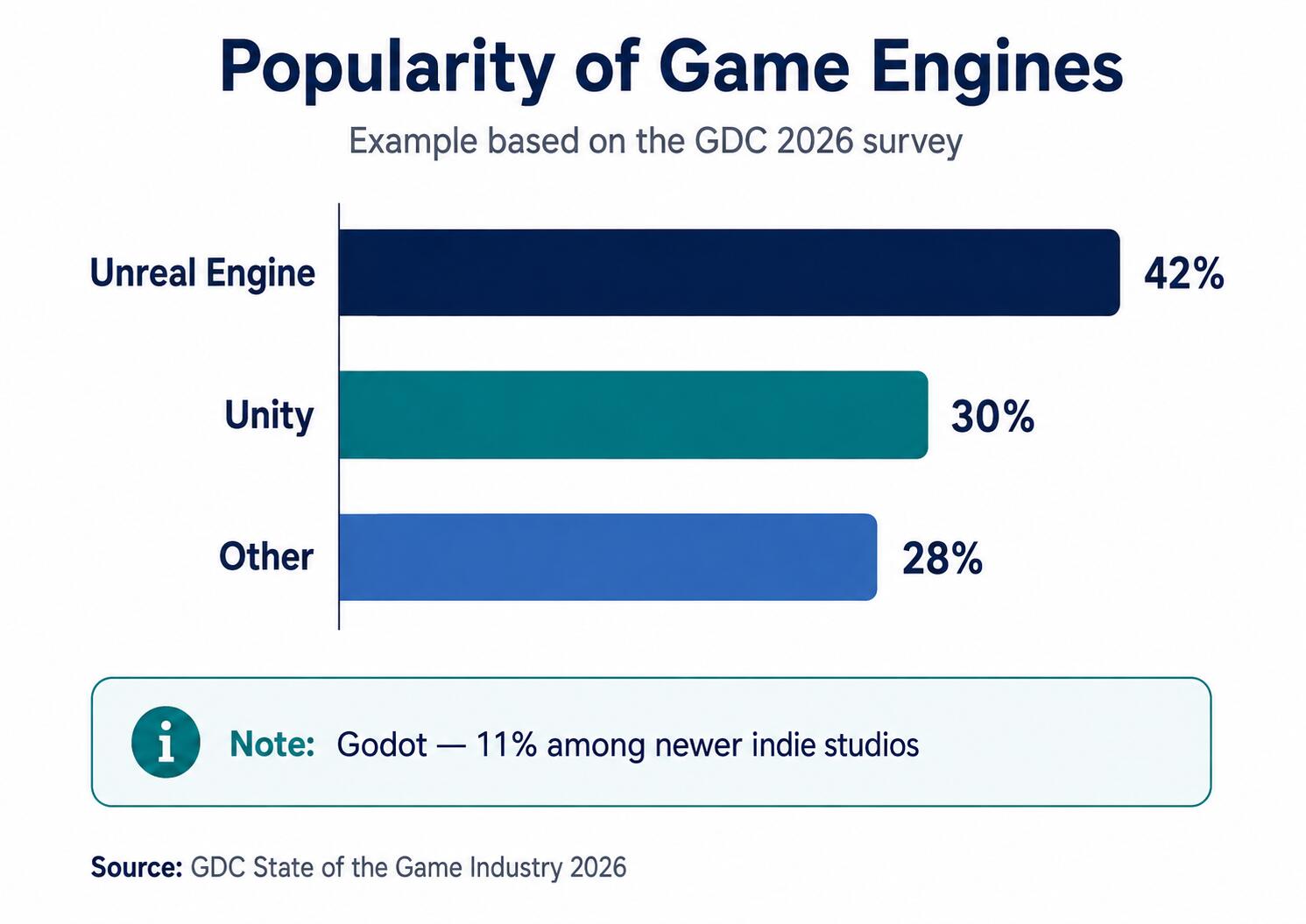
Data from the GDC State of the Game Industry 2026 survey, which polled over 2,300 game development professionals, reveals key usage trends:
It's misleading to stack these numbers into a simple "Unreal vs. Unity vs. Godot" podium. Figures for Godot often derive from different demographic sub-segments (such as indie or hobbyist groups) compared to overall studio usage metrics for Unity or Unreal. A more accurate picture separates primary industry-wide engine adoption from Godot's rapid growth among emerging indie teams.
Artificial Intelligence in Game Development
"AI in gaming" actually refers to two completely separate domains:
In-game AI, which controls non-player characters (NPCs) and game systems.
Generative AI used during development, which assists with code, art, text, or level design.
In-Game AI
Traditional in-game AI handles systems like:
Enemy behavior
Pathfinding (e.g., A*)
Decision trees
Behavior trees
Utility AI
Procedural generation
Dynamic difficulty adjustment
Crowd simulation
GOAP (Goal-Oriented Action Planning)
Example Enemy Decision Flow
Player spotted? ├── No → Continue patrolling └── Yes ├── Player in melee range? → Attack └── Out of range? → Chase player
This type of system doesn't rely on machine learning. In the vast majority of games, it is predictable, hand-crafted deterministic logic.
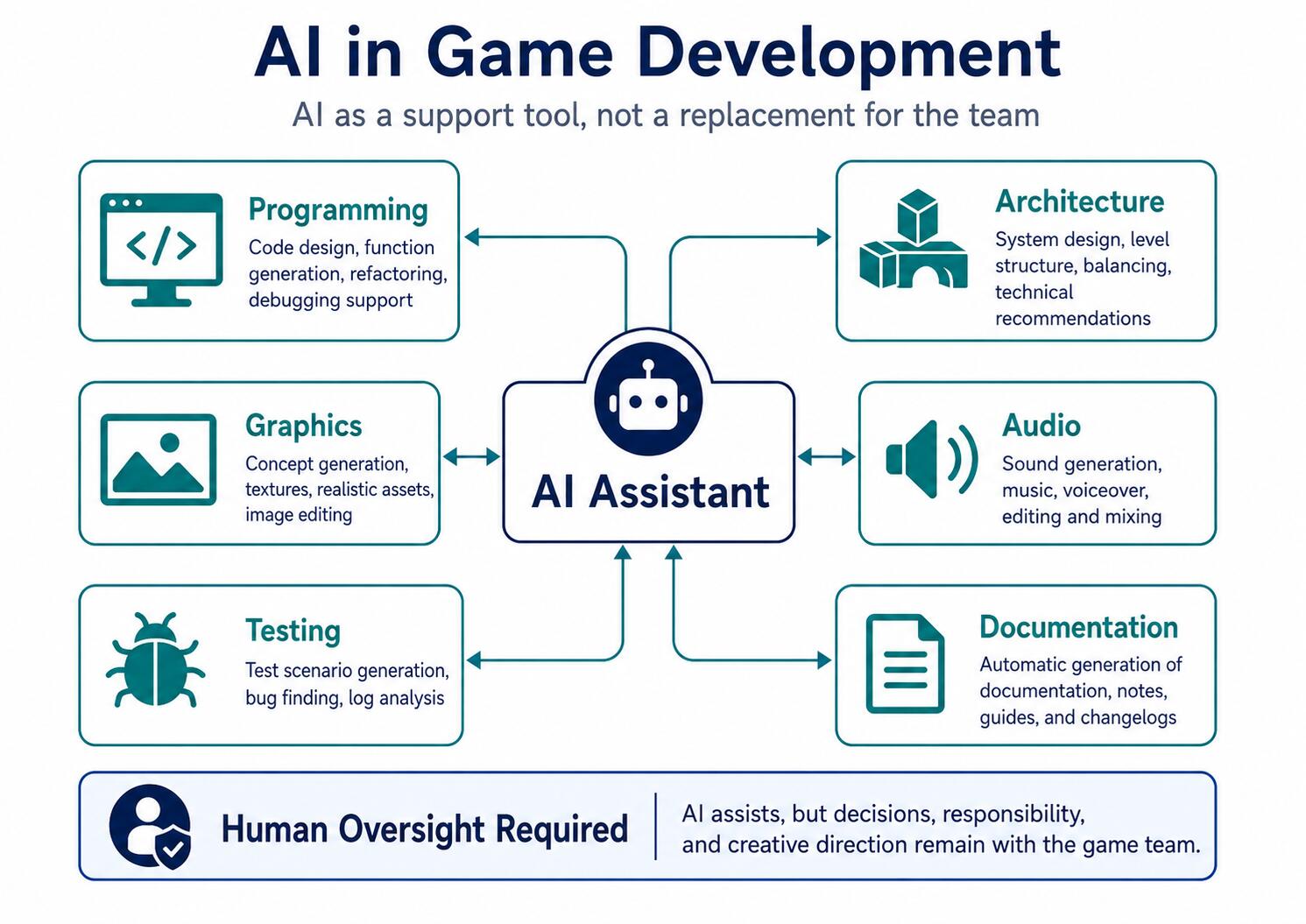
Generative AI During Development
Programming
Generative AI can assist developers with:
Rapid prototyping
Debugging and explaining cryptic error messages
Drafting unit tests
Writing documentation
Refactoring simple routines
Converting code snippets between languages or APIs
However, human oversight is mandatory. Generated code may be syntactically sound yet architecturally flawed or incompatible with your engine's version.
Architecture
AI can act as a sounding board when:
Designing system interfaces
Spotting hidden architectural dependencies
Weighing trade-offs between design patterns
Identifying potential bottlenecks
Reviewing class and component responsibilities
Final design choices must always be grounded in your project's unique context, scope, and long-term maintainability.
Art & Asset Pipeline
Common use cases include:
Concept art and mood boards
Visual references
Draft UI mockups
Temporary placeholder graphics
Dialogue drafts
Localization assistance
Marketing material variants
Risks & Pitfalls
Unclear provenance of training data
Copyright and licensing ambiguities
Inconsistent visual styles across assets
Source code privacy and IP exposure
AI hallucinations resulting in broken implementations
High maintenance overhead for automatically generated code
Vendor lock-in on external cloud APIs
Data safety regarding internal or client assets
Key Principle: Generative AI can speed up routine tasks, but it cannot take accountability for technical architecture, legal safety, or overall quality control.
Current Industry Sentiment
According to the GDC 2026 survey, roughly 36% of game industry professionals leverage generative AI tools in their workflows. They are most commonly used for research, brainstorming, routine admin tasks, coding assistance, and prototyping.
At the same time, 52% of respondents view generative AI's impact on the industry negatively, while only 7% view it positively.
This contrast highlights a clear distinction between using a tool for convenience and trusting its overall impact. AI can be handy for discrete tasks, but outputs must always be vetted for technical accuracy, licensing safety, and long-term codebase health.
What Is a Game Design Document?
A Game Design Document (GDD) is a living document that outlines the design of a video game. It serves as the single source of truth for designers, programmers, artists, audio developers, and producers alike.
A GDD is not a technical specification. It focuses on what game is being built and how it should feel, whereas technical documentation explains how it will be implemented under the hood.
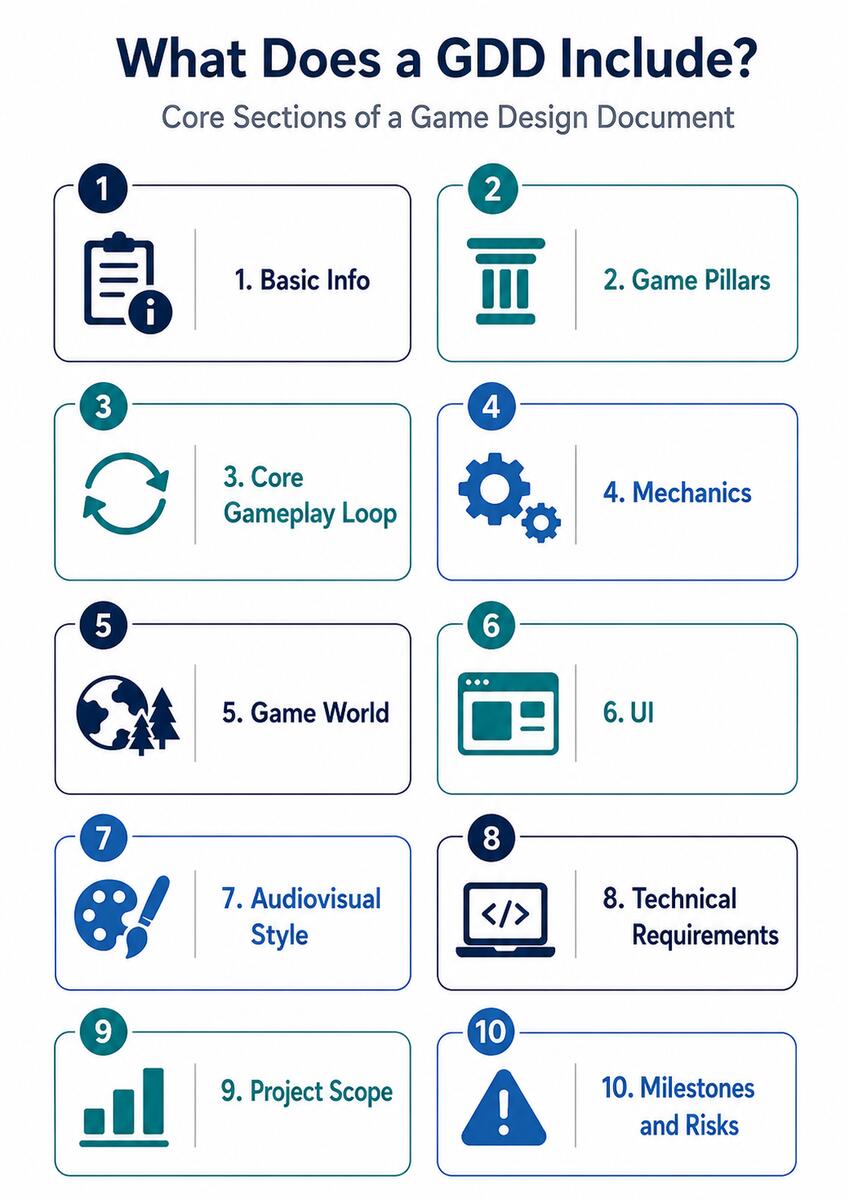
Typical GDD Structure
1. High Concept & General Overview
Working project title
Genre
Target platforms
Target audience
One-sentence elevator pitch
Primary inspirations
2. Core Game Pillars
Exploration
Tactical combat
Character progression
Base building
Co-op mechanics
Game pillars define the non-negotiable core identity of the game when feature cuts or scope changes happen.
3. Core Gameplay Loop
Explore region ↓ Gather resources ↓ Encounter obstacle / combat ↓ Upgrade character ↓ Unlock next region ↺
4. Game Mechanics
Movement systems
Combat mechanics
Inventory management
Crafting systems
Environmental interactions
Level progression
In-game economy
Save system rules
5. Game World & Narrative
Setting and lore
Story overview
Characters
Factions
Bestiary / Enemy types
Locations
Rules of the universe
6. User Interface (UI/UX)
Main menu flow
HUD layout
Inventory UI
Minimap / Map screens
Options and settings
Player onboarding / Tutorials
Accessibility options
7. Audiovisual Style
Visual reference art
Color palettes
Animation style guide
Musical direction
Sound design direction
Camera behaviors
8. Technical Requirements
Chosen game engine
Target platform specs
Target performance metrics (FPS, load times)
Device hardware support
Save data handling
Multiplayer infrastructure
Telemetry / Analytics
Localization needs
9. Project Scope
Minimal Playable Build
MVP (Minimum Viable Product)
Vertical Slice
Full Release
Out-of-scope features
Post-launch backlog
10. Milestones & Risk Management
Prototype
Vertical Slice
Pre-Alpha
Alpha
Beta
Release Candidate (RC)
Commercial Launch
Technical & production risk matrices
Important: A GDD isn't an unchangeable bible. It's a living document meant to evolve alongside prototyping, playtesting, and iteration.
Personal Experiences with Godot
The Starting Point
The practical takeaways in this article stem from developing a 2D action-adventure platformer featuring a simple combat system. The project was built in the Godot engine by a core team of four:
Two programmers
One 2D artist
One audio developer
This setup was small enough for direct communication, but large enough to demand clear boundaries of responsibility. Programming decisions directly impacted how art assets were imported, how animation trees were structured, how audio events were triggered, and how scene hierarchies were set up in the editor.
Why Godot Fit This Project
Godot proved ideal for a small 2D project thanks to its node architecture, rich out-of-the-box 2D tooling, and rapid iteration times. A player character can be isolated into its own self-contained scene featuring a physics body, collision shape, sprite, animation player, and audio nodes. The exact same modular pattern applies to enemies, interactive items, or level chunks.
For a developer making the leap from traditional software, this requires a shift in perspective: a class rarely stands completely alone anymore. Game behavior emerges from the interplay between scripts, scene nodes, editor settings, physics collision layers, signals, and custom resource files.
Shifting Mindsets: From App Dev to Game Dev
The biggest hurdle wasn't GDScript syntax or editor hotkeys—it was rethinking system design:
Player inputs must feel instantaneous
Movement must remain frame-rate independent
Animations must react cleanly to state changes
Collisions must obey the physical rules of the world
Audio cues must trigger at the exact right frame
Scenes must handle resets and reloads gracefully
For example, a character's attack isn't just an Attack() method call. In practice, it triggers a state change, plays an animation, opens a hit-frame timing window, enables a damage hitbox, plays a sound effect, applies knockback, and then smoothly transitions back into a movement state.
Small Team Collaboration
For a four-person team, establishing clear guidelines upfront is critical:
Who owns and edits the primary scene files
Naming conventions and file formats for art assets
How animation cuts and audio cues are handed off
Standardized naming for input actions, collision layers, and signals
Version control guidelines for merging scene modifications
Without these ground rules, even a small project can quickly devolve into broken scene references, asset path mismatches, and merge conflicts.
Share article
Author
Jaroslav PotočiarDeveloper, cook, and huge video game enthusiast. I enjoy learning about everything related to my field, though I naturally enjoy it most when it comes to the gaming industry.
Get the latest updates from the world of Edhouse – news, events, and current software and hardware trends.
Thank you for your interest in subscribing to our newsletter! To complete your registration you need to confirm your subscription. We have just sent you a confirmation link to the email address you provided. Please click on this link to complete your registration. If you do not find the email, please check your spam or "Promotions" folder.