Go to content|Go to the main menu|Go to search

edhouse-CookieGdpr-Policy-s
3203657
2
/en/gdpr/
421650B6A

Back to Blog

TutorialsSQA

Improve your automated tests

6.10.2026Jiří Veselý

Reqnroll is a project management tool and the successor to SpecFlow. It uses Gherkin to write test cases in natural languages and supports more than 70 languages. In addition to English, the Gherkin format supports many other languages such as German, Spanish, and French. To avoid communication errors caused by translations, it is recommended to keep specifications and acceptance test descriptions in the language of the respective domain.

Reqnroll uses Cucumber Expressions as the default method for linking step definitions with steps. 

Free and Open-Source BDD-Framework for .NET 

Benefits for Everyone 

Reqnroll facilitates test automation by making it a team effort, allowing every team member to use their skills more effectively. 

Help Your Team Fill the Gaps When Defining Requirements 

Using BDD to specify acceptance criteria helps you quickly identify hidden details and ensures that everyone interprets them the same way. 

A Common Language Understood by All Parties 

Different team members with unique viewpoints can complicate a topic. Using Gherkin helps establish a common understanding for the entire team. 

BDD (Behavior-Driven Development) 

In software engineering, behavior-driven development (BDD) is a software development process that encourages collaboration among developers, quality assurance experts, and customer representatives on a software project. 

3 Parts 

Part 1 

Developer 

Focus on coding – understanding the needs of stakeholders. 

Tester 

Focus on writing tests in natural language instead of creating complex test codes.  

Reqnroll transforms Gherkin scenarios into automated tests and helps teams link automation with functional files, making it easier to share the resulting examples. 

Product Owner 

More effective collaboration with your team. 

Part 2 

Formulation 

Formulation is the process of converting key examples from discovery into formal documentation, such as easy-to-read Gherkin scenarios. 

Part 3 

Automation 

Automation involves transforming formalized scenarios into automated acceptance tests. These tests significantly reduce the effort required for regression testing and provide immediate feedback when system behavior no longer matches its specification documentation.  

Developers implement step definitions. 

Simple Example 

Test files are called "feature" files and contain individual scenarios (1-N), see below. 

Feature file “Calculator.feature” (created by tester, product owner, developer) 

Feature: Calculator 


Simple calculator for adding two numbers 


@CalculatorXGherkin 

Scenario: Add two numbers 

Given the first number is 50 

And the second number is 70 

When the two numbers are added 

Then the result should be 120 


Scenario: Add two numbers 2 

Given the first number is 10 

And the second number is 10 

When the two numbers are added 

Then the result should be 20

Step definitions (created by developer)

using NUnit.Framework; 


namespace CalculatorXGherkin.StepDefinitions 

{ 

    [Binding] 

    public sealed class CalculatorStepDefinitions 

    { 

        int? firstNumber = null; 

        int? secondNumber = null; 


        [Given("the first number is {int}")] 

        public void GivenTheFirstNumberIs(int number) 

        { 

            firstNumber = number; 

        } 


        [Given("the second number is {int}")] 

        public void GivenTheSecondNumberIs(int number) 

        { 

            secondNumber = number; 

        } 


        [When("the two numbers are added")] 

        public void WhenTheTwoNumbersAreAdded() 

        { 

            Assert.That(firstNumber, Is.Not.Null); 

            Assert.That(secondNumber, Is.Not.Null); 

        } 


        [Then("the result should be {int}")] 

        public void ThenTheResultShouldBe(int result) 

        { 

            if (firstNumber + secondNumber != result) 

            { 

throw new Exception($"Expected {result} but got {firstNumber + secondNumber}"); 

            } 

        } 

    } 

} 

 Let's run the test

PS D:\Sources\CalculatorXGherkin>  dotnet.exe test 

Restore complete (1.1s) 

  CalculatorXGherkin net8.0 succeeded (1.2s) → bin\Debug\net8.0\CalculatorXGherkin.dll 

NUnit Adapter 6.0.0.0: Test execution started 

Running all tests in D:\Sources\CalculatorXGherkin\bin\Debug\net8.0\CalculatorXGherkin.dll 

   NUnit3TestExecutor discovered 2 of 2 NUnit test cases using Current Discovery mode, Non-Explicit run 

Given the first number is 50 

-> done: CalculatorStepDefinitions.GivenTheFirstNumberIs(50) (0.0s) 

And the second number is 70 

-> done: CalculatorStepDefinitions.GivenTheSecondNumberIs(70) (0.0s) 

When the two numbers are added 

-> done: CalculatorStepDefinitions.WhenTheTwoNumbersAreAdded() (0.0s) 

Then the result should be 120 

-> done: CalculatorStepDefinitions.ThenTheResultShouldBe(120) (0.0s) 


Given the first number is 10 

-> done: CalculatorStepDefinitions.GivenTheFirstNumberIs(10) (0.0s) 

And the second number is 10 

-> done: CalculatorStepDefinitions.GivenTheSecondNumberIs(10) (0.0s) 

When the two numbers are added 

-> done: CalculatorStepDefinitions.WhenTheTwoNumbersAreAdded() (0.0s) 

Then the result should be 20 

-> done: CalculatorStepDefinitions.ThenTheResultShouldBe(20) (0.0s) 

NUnit Adapter 6.0.0.0: Test execution complete 

CalculatorXGherkin test net8.0 succeeded (1.3s) 

Test summary: total: 2, failed: 0, succeeded: 2, skipped: 0, duration: 1.3s 

Build succeeded in 4.1s

Further Use - WebUI Testing 

Reqnroll can also be utilized for testing web applications. We implement steps (step definitions) for buttons, dropdown lists, etc. For example, in a React project, we use a special attribute “data-testid” to identify the tested item. 

Step definition

/// <summary> 

/// Button is located by attribute 'data-testid' 

/// </summary> 

/// <param name="name"></param> 

/// <returns></returns> 

[Then(@"Click on button '([^']*)'")] 

public async Task ThenClickOnButton(string id) 

{ 

    Button button = new(driver.Page, id); 

    await button.ClickOnButton(); 

} 

// Button press implementation 

internal class Button 

{ 

     private readonly string dataTestId; 

     private readonly IPage pageObject; 


     public Button(IPage page, string id) 

     { 

        dataTestId = id; 

        pageObject = page; 

     } 


     /// <summary> 

     /// Buton is located by data-testid attribute 

     /// </summary> 

     /// <returns></returns> 

public async Task ClickOnButton() 

     { 

          ILocator button = pageObject.GetByTestId(dataTestId); 

          await Assertions.Expect(button).ToBeVisibleAsync(); 

         await Click(button); 

     } 
 

private async Task Click(ILocator button) 

{ 

    var isDisabled = await button.IsDisabledAsync(); 

    if (!isDisabled) 

    { 

        await button.ClickAsync(); 

    } 

} 

}

Feature file (creating a new user)

Feature: ProcessCreateUser 

@PipelneServiceRole 

@Createuser 

Scenario: Create new user 

    Given I navigate to the application '/login' 

    And Login 

    When User logged 

    Then Go to Page '/settings' 

    When Page is '/settings' 

    Then Click on button 'usermanagement.tabtitle' 

        And Click on button 'usermanagement.createuser' 

        And Fill input 'createusermodal.username' with '#TestUserName2' 

        And ComboBox 'createusermodal.role' select item 'Service' 

        And Fill input 'createusermodal.password' with '#TestPassword' 

        And Fill input 'createusermodal.confirmpassword' with '#TestPassword' 

        And Click on button 'createusermodal.cancel' 

    Then Logout 

The prefix ‘#’ denotes a Microsoft Windows operating system variable.

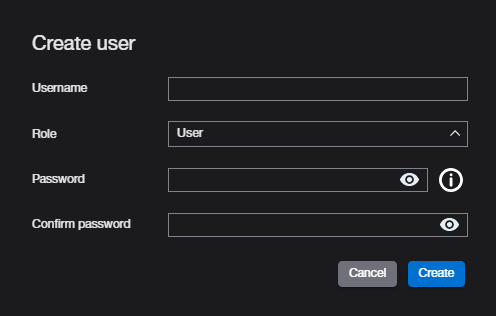
User creation form

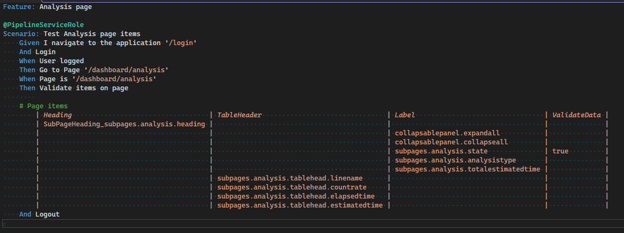
We can also test items on individual web pages

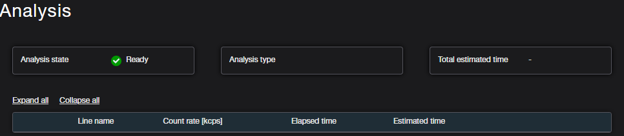
Tested page

Step definition

[Then(@"Validate items on page")] 

 public async Task ThenValidateItemsOnPage(Table table) 

 { 

     IEnumerable<PageItem> pageItems = table.CreateSet<PageItem>(); 

     PageItems items = new PageItems(driver.Page, pageItems); 

     await items.CheckItems(); 

 } 

Here we see loading the table into a variable, which we subsequently iterate through

IEnumerable<PageItem> pageItems = table.CreateSet<PageItem>();

Item detection

public async Task<bool> CheckItems() 

 { 

     using var item = pageItems.GetEnumerator(); 

     while (item.MoveNext()) 

     { 

         string labelLocatorId = string.Empty; 

         ILocator labelLocator; 


         // Label 

         if (!string.IsNullOrEmpty(item.Current.Label)) 

         { 

             labelLocator = page.GetByTestId(item.Current.Label); 

             await Assertions.Expect(labelLocator).ToBeVisibleAsync(); 

         } 

… 

  } 

Project website 

https://docs.reqnroll.net/latest/index.html# 

Plugin for external data 

https://docs.reqnroll.net/latest/integrations/externaldata.html 

Supported data sources: 

  • CSV files (format ‘CSV’, extension .csv) 

  • Excel files (format Excel, extensions .xlsx, .xls, .xlsb) 

Using tables with data 

https://docs.reqnroll.net/latest/automation/datatable-helpers.html 

Share article

Author

Jiří Veselý

Jiří VeselýI started my professional career as a custom software developer. After a few years, I moved into software testing, where I can fully leverage my curiosity, analytical mindset, and drive to find ways to improve quality.

Edhouse newsletter

Get the latest updates from the world of Edhouse – news, events, and current software and hardware trends.

By signing up, you agree to our Privacy Policy.

Thank you for your interest in subscribing to our newsletter! To complete your registration you need to confirm your subscription. We have just sent you a confirmation link to the email address you provided. Please click on this link to complete your registration. If you do not find the email, please check your spam or "Promotions" folder.